Pango Playground for kids
- 4.0
- Rating
- 10.00K
- Installs
- $5.99
- Price
 Analysis by App-foxy
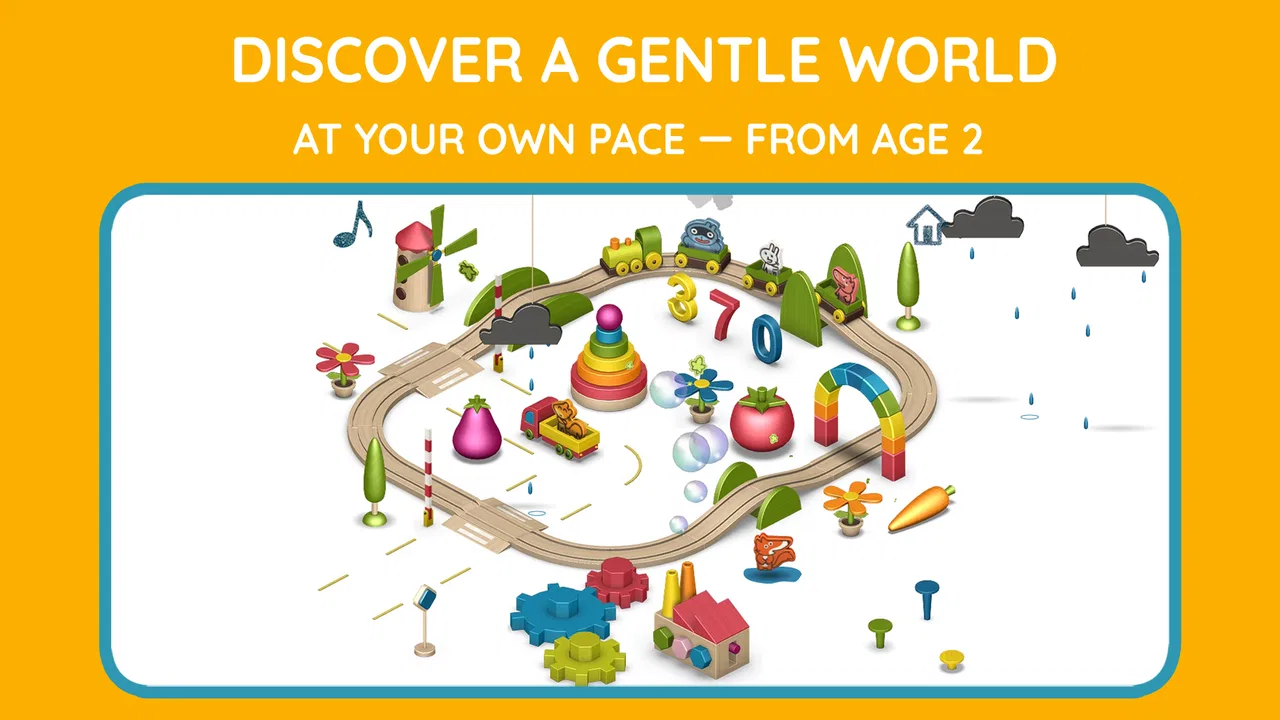
When I tried Pango Playground, I found a children’s game built less around winning and more around letting a child explore at their own pace. The central idea is simple: children can move through a small interactive world, touch objects, rearrange parts of the scene, and use their imagination to create little situations. That makes it an educational game in a quiet, open-ended way rather than a traditional lesson with scores, timers, or a fixed sequence of exercises.
I think that difference matters. Many preschool apps ask children to identify a letter, choose a color, complete a puzzle, or repeat a correct answer. This one gives them a setting to investigate. In my experience, the value appears when a child starts experimenting without being told exactly what to do. They learn through cause and effect, attention, pretend play, and language shared with an adult nearby.
The game comes from Studio Pango - Kids Fun preschool learning games, and it is aimed at Everyone. It is available for $5.99, which places it closer to a paid digital toy than a casual free download. The store shows a 4.0 average from around 300 ratings, with over 10K installs. Those figures suggest a modest but established audience, while the paid format may appeal to parents who would rather make one direct purchase than navigate a free app designed around repeated prompts to buy something.
You May Also Like

 Pandora - Music & Podcasts
Pandora’s Music Is Easy to Start, but Harder to Recover
Pandora’s strength is its low-effort path from a seed to a station. Its weak spot is how much confidence it asks you to place in connection, setup, and quiet recovery.

 AccuWeather: Weather Radar
AccuWeather Review: A Quick, Clear Forecast for Everyday Decisions
For everyday plans, the best forecast is the one you can understand quickly. AccuWeather makes rain timing, radar, and local conditions easy to act on, with a few trade-offs.

 Hill Climb Racing
Why Hill Climb Racing Still Turns Crashes Into One More Run
A tiny car, a bumpy hill and one more upgrade: Hill Climb Racing keeps resurfacing because its simple chaos makes every near-miss feel personal.

 AliExpress - Shopping App
AliExpress Makes Global Shopping Feel Personal, but Shoppers Bear the Risk
AliExpress turns a global marketplace into a pocket-sized discovery engine. Its reach is useful, its shopping loop compelling, and its trade-offs easy to miss.

 Lords Mobile: Kingdom Wars
Lords Mobile Is a Kingdom-Building Routine, Not a Quick Match
A case-by-case verdict on the building, battles, device demands, and social commitments that make Lords Mobile rewarding for some players and exhausting for others.

 PDF Scanner app - TapScanner
TapScanner Makes Paperwork Easier to Capture, Check, and Share
TapScanner makes scanning with a phone feel less like a rescue operation and more like a dependable step in getting work done. Its capture tools are useful, though not flawless.
More From Our News Desk
View All News


Exploration is the real learning tool
I find the most useful way to judge this section is to ask what a child can decide to do before anyone gives them an instruction. That first choice—where to look, what to touch, and what to make of a response—sets the tone for the play that follows and helps parents tell whether open exploration suits their child.
A small world that invites children to act
The strongest capability here is the interactive playground itself. Rather than presenting a workbook on a screen, the game gives children a space where touching and moving things becomes the activity. A child may begin by tapping randomly, then notice that an object responds, a character changes position, or a scene develops into a simple story. That transition from accidental discovery to intentional play is where the experience becomes useful.
I would describe it as guided imagination without a strict script. The child is not merely watching an animation, but the game also does not demand that they invent everything from nothing. The environment provides enough material to start a pretend situation. This is especially helpful for preschoolers who enjoy stories but still need concrete visual objects to organize their ideas.
For parents, the important point is that the game’s educational value is not mainly about memorizing facts. It supports observation, sequencing, hand-eye coordination, and expressive language. If you sit beside a child and ask what is happening, why a character moved, or what should happen next, the playground becomes a prompt for conversation. Used alone, it is a gentle exploration toy; used together, it can become a short storytelling activity.
Why the open-ended design changes the experience
Open-ended play can feel less impressive than a game full of levels because there is no obvious progress bar to show what the child has achieved. However, that is also its advantage. A child who is tired, shy, or not ready for formal learning can still participate without the pressure of giving the right answer. The app meets the child at their current mood instead of forcing every session into a lesson plan.
I noticed that this kind of design works best when the adult resists taking control. It is tempting to demonstrate every interaction immediately, but doing so can turn discovery into imitation. A better approach is to let the child explore first, then ask a small question. “What do you think this does?” is more useful here than explaining the whole scene in advance.
The practical strength is not complexity; it is the freedom to turn a simple touch into a short story. That makes the game particularly suitable for children who lose interest in repetitive drills but enjoy pretending, arranging, and finding out what happens next.
How I would use it during an ordinary day
A realistic use case is the quiet period before dinner. A preschool child may be restless but not need a full television program. I would open the game for a short, supervised session and give the child one small challenge: create a scene in which a character goes somewhere, encounters something, and returns. The app supplies the visual setting, while the child supplies the order and meaning.
Afterward, I would ask the child to retell the scene without looking at the screen. That turns a few minutes of tapping into a memory and language exercise. The game itself does not need to announce that this is educational; the parent can add the learning layer naturally. This is one of the less obvious ways to get more from it, because the same interactive moment can support vocabulary, sequencing, and confidence in speaking.
Another useful routine is to use it as a transition between activities rather than as an unlimited distraction. A short session after preschool, followed by putting the device away and drawing a favorite scene, gives the child a way to carry the imaginative play into the physical world. I would not rely on it as a babysitter for long stretches, but it can work well as a calm bridge when a child needs to settle.
What happens when a child plays
I’d pay attention to the small signals of engagement here, not just whether a child seems busy. A pause to inspect something, a repeated action, or an attempt to explain what is happening can show that play is becoming more intentional; the next section looks at how those moments can be noticed without turning the experience into a test.
Learning through touch, movement, and repetition
The interaction style is approachable for young children because the main instruction is exploration. A child can try touching different parts of the world and see what responds. Repetition is not a flaw in this context. Preschoolers often repeat the same action because they are checking whether the result is consistent, and that repeated testing helps them understand the environment.
Parents should expect the child to revisit familiar actions rather than move neatly from one discovery to the next. The first session may be mostly tapping and watching. Later sessions can become more deliberate, with the child combining actions or using the environment to act out a familiar idea. That gradual change is more meaningful than a quick tour through every available interaction.
One tip I found valuable is to give the child time before offering help. If an interaction seems unclear, wait and watch rather than tapping for them. This preserves the sense that the child is the person making things happen. If they become frustrated, offer a verbal prompt instead of taking the device: suggest looking in another part of the scene, or ask what they have already tried.
Turning play into storytelling
The game becomes more distinctive when it is treated as a storytelling tool. I would encourage a child to choose a beginning, middle, and ending, even if the story is only a few sentences long. For example, the child can describe who is in the scene, what changed, and how the situation finished. The visual world gives them something concrete to point at, which can make storytelling easier than asking them to invent a story from a blank page.
This approach also helps adults notice what the child understands. A child may know the names of objects but struggle to connect them in sequence. Another may create imaginative stories but need help describing position, movement, or cause. By listening to the child’s narration, a parent can see whether the game is encouraging observation, vocabulary, or creative confidence.
It is worth keeping the questions open. Asking “What happened?” allows more imagination than asking the child to identify a predetermined answer. If the child gives an unexpected explanation, I would follow it rather than correct it immediately. The playground is most successful when it supports the child’s version of the story instead of becoming another adult-controlled exercise.
What the game does not replace
This is not the right choice if your main goal is structured early literacy, arithmetic practice, phonics, or measurable skill progression. A child who needs repeated letter sounds or number exercises will probably get more direct value from a dedicated learning app. Those alternatives usually provide clearer objectives and more obvious feedback, while this game depends on imagination and adult interaction to reveal its educational benefits.
It also may not satisfy children who need constant novelty. Open-ended environments can feel wonderful to one child and strangely empty to another, especially if that child prefers racing, collecting, or completing levels. The absence of conventional goals is intentional, but it still represents a trade-off. Before buying, parents should ask whether their child enjoys pretend play or usually abandons activities that do not provide a clear task.
The paid price is another consideration. At $5.99, the game asks for a direct commitment rather than letting a family test it through a free entry point. I see the benefit in a straightforward purchase, but the cost is harder to justify if the child rarely engages with quiet imaginative play. It is best viewed as a focused digital play experience, not as a complete collection of preschool subjects.
The best setting for Pango Playground
I think the setting around the device matters as much as the screen: a calm moment and an adult who can listen often make imaginative play easier to sustain. In the next section, I consider how to fit the game into a family routine while keeping the child’s own ideas at the center.
Who is likely to enjoy it most
I would recommend it most to families with preschool children who like touching everything, inventing small stories, and repeating an interaction until they understand it. It is also a good fit for parents who want to sit with a child and talk, rather than hand over an app that is expected to teach independently.
Children who are still developing confidence with language may benefit from the visual prompts. They do not have to begin with a long story. Naming one object, describing one action, or explaining where a character went can be enough. Over time, those small comments can grow into more complete narratives, especially when an adult responds with interest instead of turning the moment into a test.
The game can also suit siblings or a parent and child sharing one device, although the experience may become less calm if several children want to control the screen at once. I would set a simple turn-taking rule before starting. Since the appeal comes from manipulating the world, taking turns can be more frustrating here than in a passive video, so expectations matter.
Who should choose something else
I would skip it for a child who needs explicit instruction, frequent rewards, or a strong sense of completion. It is also not my first recommendation for families looking for a broad educational curriculum. A more structured preschool app would be better for practicing specific academic targets, while a conventional game would be better for children who want challenge, competition, or a clear series of levels.
Parents who prefer independent screen activities should think carefully as well. The game can be explored alone, but its richest use comes from conversation and imaginative follow-up. If you have no interest in joining occasionally, you may see only a child tapping around without recognizing the language and storytelling opportunities underneath.
That does not make the app weak. It simply defines its role. This is a digital playground, not a digital teacher in the narrow sense. The more a family values unhurried exploration, the more likely the purchase will feel worthwhile.
Practical buying and device considerations
Before deciding whether this is a good fit, I’d separate the appeal of the play style from practical questions such as purchase cost and device compatibility. The following section brings those considerations together so parents can make a sensible choice for their household, rather than relying on a rating or a child’s first few minutes alone.
What the listing tells parents
The game was released on November 22, 2012, and its current version is 26013034. It requires Android 5.0 or later, so families using an older Android device should check compatibility before purchasing. The age classification is Everyone, which fits the gentle preschool focus and makes it easier to consider for a shared family device.
The developer name, Studio Pango - Kids Fun preschool learning games, clearly places this title within a broader preschool-oriented catalog. That may be useful for parents who already know the developer’s style and want another experience centered on young children. At the same time, I would judge this particular game by its exploratory format rather than assume every title from the same developer will offer the same kind of play.
The rating of 4.0 from around 300 ratings gives it a generally positive reception without suggesting universal agreement. I read that as a reason to match the game to the child, not as a guarantee. A child who loves open-ended pretend play may enjoy it immediately, while a child expecting puzzles or rewards may not understand what to do with it.
How to get the most value from the purchase
Before the first session, I would decide what role the app will have in your routine. If the goal is independent quiet time, keep expectations modest. If the goal is language development, sit nearby and use the scene as a conversation starter. If the goal is imaginative play, avoid explaining every possible interaction and let the child discover the environment.
A particularly effective workflow is to alternate control. Let the child create a scene first, then ask them to describe it while you listen. On another day, you can describe a simple situation and invite the child to build or act it out. This reverses the usual pattern of an adult asking questions and gives the child a chance to direct the activity.
I would also stop while the child is still interested rather than waiting for boredom. Ending after a satisfying little story makes it easier to return later. Because the experience is not built around completing a long sequence, there is no need to stretch a session. Short, purposeful play is a better match for its design than leaving it open indefinitely.
My final view after using it
Pango Playground works because it understands that preschool learning does not always need to look like a lesson. Its interactive world gives children something concrete to manipulate, then leaves enough room for them to invent meaning. I enjoyed it most when I treated the game as a starting point for conversation rather than as a self-contained educational course.
The main trade-off is clear: you pay for an open-ended play space, not a large set of academic exercises. Some children will find that freedom inviting; others will need more direction. The $5.99 price makes the decision worth considering carefully, particularly if your child prefers structured games or loses interest without visible goals.
For the right family, though, the simplicity is the point. A few minutes of exploration can become a story, a vocabulary exercise, or a chance for a child to practice making choices. I recommend it to parents who want calm, imaginative screen time and are willing to participate occasionally. I would choose a more conventional educational app for focused reading or math practice, but for gentle digital pretend play, this game has a clear and useful place.
FAQs for Pango Playground for kids
01What is Pango Playground for Kids?
Pango Playground is an interactive children’s app designed for imaginative, open-ended play. Kids can explore colorful scenes, move characters and objects, create simple stories, and discover playful animations through touch. Instead of following a strict level system or competing for points, children are encouraged to experiment at their own pace, making it suitable for preschoolers and young children who enjoy creative digital activities.
02What age group is Pango Playground suitable for?
The app is generally aimed at preschool and early-school-age children, although the ideal age can vary depending on a child’s reading ability and experience with tablets or phones. Younger children may need an adult to explain the controls at first, while older children can usually explore independently. Parents should still review the app’s store age rating and supervise use according to their child’s needs.
03Does Pango Playground require an internet connection?
Pango Playground may be usable offline after installation, which is convenient for travel, waiting rooms, or situations where Wi-Fi is unavailable. However, certain functions connected to downloading the app, restoring purchases, receiving updates, or accessing related content may require an internet connection. It is best to open the app once while online and confirm that the available activities work as expected before giving it to a child offline.
04Is Pango Playground safe for children and free from advertising?
Pango Playground is designed as a child-friendly experience, with simple interactions and content focused on play rather than social communication. Depending on the edition and platform listing, advertising and purchase features can differ, so parents should check the current store description carefully. We also recommend reviewing privacy settings, disabling unwanted in-app purchase options, and using device parental controls before handing over the device.
05Is Pango Playground free to download, and does it include in-app purchases?
Availability and pricing can differ between Android and iOS, as well as between versions or bundles in the Pango series. Some listings may offer the app as a paid download, while others can include optional purchases or access through a subscription or collection. Before downloading, parents should check the exact store page for the current price, supported devices, purchase terms, and whether all activities are included.
Pros
- Simple controls make it easy for young children to explore independently.
- Creative activities encourage imagination without strict goals or time limits.
- Bright visuals and friendly characters are appealing to preschool-age users.
- Offline access allows play during travel or without an internet connection.
- No competitive scoring reduces pressure and supports relaxed
- open-ended play.
Cons
- Some activities may feel repetitive after extended use.
- The app is mainly suited to younger children
- limiting long-term appeal.
- Parents may find the educational depth lighter than dedicated learning apps.
- Touchscreen interactions can be challenging for children with limited coordination.
- Device storage and compatibility requirements may vary across older phones and tablets.

Pango Playground for kids
Gallery